Why WhatsApp Templates Get Rejected: 11 Reasons and Fixes
Meta rejects WhatsApp templates for predictable reasons — wrong category, variable errors, pushy wording, button problems. Here are 11 causes and how to fix each.
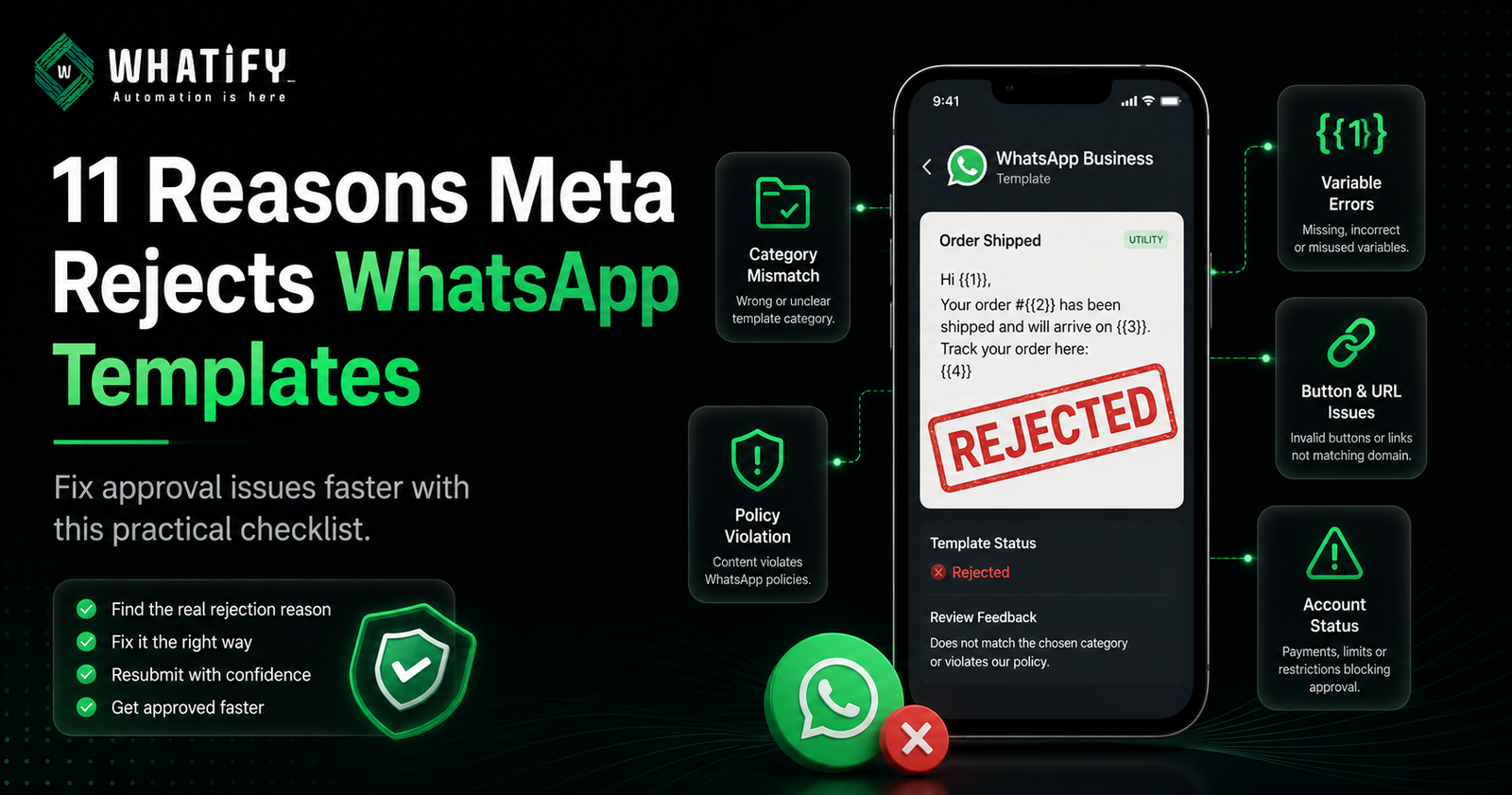
Meta reviews every WhatsApp template before you can send it, using automated checks and human reviewers. Rejections are common and almost always fall into a small number of predictable patterns. Most templates are approved on resubmission once the actual cause is identified.
The trap is guessing. Meta's rejection notice is often generic, so businesses edit the wrong thing and get rejected again. Work through these five families in order.
Family 1: Category and intent mismatch
1. Promotional content in a utility template. You selected utility and wrote a sales line. This is the single most common rejection.
✗ "Your order #4821 has shipped. Get 20% off your next order with SAVE20!" ✓ "Your order #4821 has shipped and will arrive on Thursday. Track it here."
2. Vague purpose. The reviewer cannot tell what the message does. "Hello! We have something for you" gives them nothing to approve. Name the specific event or offer.
3. Authentication category misuse. The authentication category is for one-time passcodes and login verification only. Using it for anything else — including order OTPs that are really confirmations — gets rejected.
If category selection is your recurring problem, our guide to WhatsApp template categories and pricing explains how Meta decides.
Family 2: Variable and formatting errors
4. Variables without context. Meta cannot verify a message it cannot read.
✗ "Hi {{1}}, your {{2}} is {{3}}." ✓ "Hi {{1}}, your order {{2}} is ready for pickup at {{3}}."
5. Missing or mismatched sample values. Every variable needs a realistic sample when you submit. Blank samples, or samples that do not match the variable's apparent purpose, cause rejection.
6. Broken variable syntax. Variables use double curly braces in sequence — {{1}}, {{2}}, {{3}}. Single braces, skipped numbers or out-of-order numbering all fail.
7. Formatting noise. ALL CAPS, multiple exclamation marks, excessive emoji and stray special characters read as spam to automated review. One exclamation mark is plenty.
A related runtime error worth knowing: even after approval, sending fails if a variable's value contains line breaks, tabs or more than four consecutive spaces. That is a delivery error, not a rejection, but it looks similar in a dashboard.
Family 3: Content and policy violations
8. Requesting sensitive information. Never ask for passwords, PINs, full card numbers or bank credentials in a template. Rejected immediately, and rightly.
9. Unverifiable claims and pressure tactics. "Guaranteed returns", "you will double your income", aggressive countdown language and anything implying a threat or penalty. State facts.
10. Restricted categories. Alcohol, tobacco, weapons, gambling, adult content and certain financial products are restricted or prohibited depending on jurisdiction. Check Meta's commerce and messaging policies before building a campaign around them.
Family 4: Button and link problems
11. Button errors. Three common failures: button text longer than the permitted character count, more buttons than the template type allows, and — most often missed — a URL button pointing to a domain that does not match your registered business domain. Shorten the label, cut the button count, and use your own verified domain.
Family 5: Rejections that are not about your template
This family is why so many resubmissions fail. Sometimes the template is fine and something else is wrong:
|
Underlying issue |
How it appears |
|
WhatsApp Business Account restricted or disabled |
Templates rejected regardless of content |
|
Failed payment or zero balance |
Templates not processed; approved templates may become unselectable |
|
Messaging limit reached |
Approval blocked pending more account activity |
|
Duplicate template name |
Rejection, or the wrong template firing at send time |
|
Template previously paused for low quality |
Re-approval blocked until quality recovers |
If your template is clean and still rejected, check account status and billing before editing the text again. A zero wallet balance can lock the messaging window and hide approved templates entirely — an issue that looks like a template problem and is not.
Quality-related pauses are covered in our quality rating recovery playbook.
A pre-submission checklist
Run this before every submission:
· Category matches what the message actually does
· Every variable has surrounding context words
· Sample values filled and realistic
· Variables numbered sequentially with double braces
· No ALL CAPS, maximum one exclamation mark
· No request for sensitive data
· No unverifiable claims
· Button text within the character limit
· URL buttons point to your registered domain
· Template name is unique
· Account is in good standing with a funded wallet
If you are rejected anyway
1. Read the reason carefully — it is generic, but it usually names a family.
2. Fix one thing at a time. Changing five elements at once teaches you nothing when it passes.
3. Resubmit. Review is often quick, though timing varies with volume.
4. If a clean template is rejected repeatedly, review is occasionally inconsistent — edit and resubmit, and check account standing in parallel.
Whatify validates template structure before submission and flags variable and formatting issues in the builder, which removes most of Family 2 before Meta ever sees it. Start a 14-day free trial to test your templates.
Check the current policy
Template rules are set by Meta and updated periodically. Verify current requirements in Meta's message template guidelines before rebuilding a large template library.
EXTERNAL SOURCES
1. Meta — Message templates, WhatsApp Business Management API documentation: submission requirements, variable format, button rules, review process. https://developers.facebook.com/docs/whatsapp/business-management-api/message-templates/
2. Meta — WhatsApp Business Messaging Policy: prohibited and restricted content categories. https://business.whatsapp.com/policy
3. Meta — Cloud API error codes: template paused (132015), template disabled (132016), and delivery-time parameter formatting errors. https://developers.facebook.com/docs/whatsapp/cloud-api/support/error-codes
Frequently Asked Questions
: Most rejections fall into five families: category and intent mismatch, variable or formatting errors, content and policy violations, button or link problems, and account-level issues unrelated to the template text. Category mismatch — promotional content in a utility template — is the single most common cause.
Identify which family the rejection belongs to, change one thing, and resubmit. Check that the category matches the message's purpose, every variable has surrounding context, sample values are filled in, and no promotional language sits inside a transactional message. Most templates pass on the second attempt.
Yes, and this is frequently missed. A restricted WhatsApp Business Account, a failed payment or zero balance, a reached messaging limit, a duplicate template name, or a template previously paused for low quality can all block approval regardless of how well the template is written.
Review is often completed quickly, but timing varies with submission volume and whether a human reviewer is involved. Submit templates well before a campaign date rather than the same day, and never schedule a launch that depends on a same-day approval.
A zero balance on the account is a common cause. Templates remain approved and synced but become unselectable, and the messaging window can lock until the balance is topped up. Check wallet balance before assuming there is a template or sync problem.
Ready to automate your WhatsApp marketing?
Start your 14-day free trial today. No credit card required.
Start Free Trial